
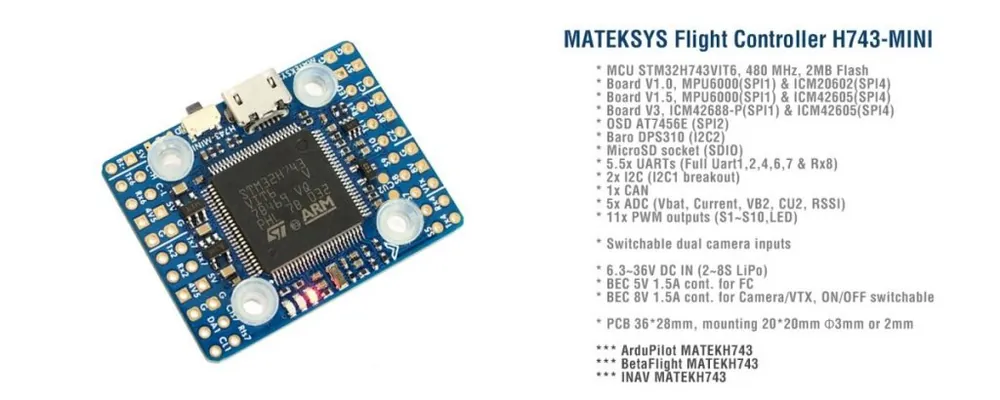

Opis
What is new on the H743-mini V3
- ICM42688-P+ICM42605 instead of MPU6000+ICM42605
- PWM 10 & 11 instead of PWM9 & 10(V1/V1.5)
- Other functions, layout and components are same as previous board version.
- H743-mini V3 has betaflight_4.3.0 preloaded for QC
ArduPilot
- H743-mini-V3 with ICM42688-P is supported by ArduPilot 4.2 or higher,
- ICM42688-P is defined as first IMU (IMU0) , ICM42605 is the 2nd (IMU1).
- with ArduPilot 4.2, set INS_ENABLE_MASK to 7 or default 127.
- It is recommended to use STM32CubeProgrammer to erase MCU and upload firmware. check this blog http://www.mateksys.com/?p=6905
INAV
- H743-mini-V3 is not supported by INAV4.1 downloaded from configurator. pls download inav_4.1.0_MATEKH743_42688 from our website.
- Starting with INAV5.0, V1/V1.5/V3 will share the same firmware.
BetaFlight
- IMU ICM42688-p is supported by BetaFlight 4.3 or higher.
- icm42688-p is the first IMU(default), ICM42605 is the second IMU.
- Target MATEKH743 in BetaFlight 4.2.x list doesn’t support ICM426XX series, You need to flash it with BF4.3_RC or latest
FC Specifications
- MCU: STM32H743VIT6, 480MHz , 1MB RAM, 2MB Flash
- Board V1.0 IMU: MPU6000 (SPI1) & ICM20602 (SPI4)
- Board V1.5 IMU: MPU6000 (SPI1) & ICM42605 (SPI4)
- Board V3 IMU: ICM42688-P (SPI1) & ICM42605 (SPI4)
- Baro: Infineon DPS310 (I2C2)
- OSD: AT7456E (SPI2)
- Blackbox: MicroSD card socket (SDIO)
- 5.5x Uarts (1,2,4,6,7, Rx8)
- 11x PWM outputs
- 2x I2C (I2C1/DA1 CL1 pads, no I2C2 breakout)
- 1x CAN (C-H, C-L pads)
- 5x ADC (VBAT, Current, RSSI, VB2, CU2)
- 3x LEDs for FC STATUS (Blue, Red) and 3.3V indicator(Red)
- 1x JST-SH1.0_8pin connector (Vbat/G/Curr/Rx8/S1/S2/S3/S4)
- Dual Camera Inputs switch
- 8V power ON/OFF switch
Power
- Vbat Input: 6.3~36V (2~8S LiPo)
- BEC: 5V 1.5A cont. (Max.2A)
- BEC: 8V 1.5A cont. (Max.2A), 8V outputs stable when Vbat>=10V, 8V outputs 80% of Vbat when Vbat< 10V
- LDO 3.3V: 200mA
- VB2 pad supports Max. 69V (voltage divider 1K:20K)
- Static power: 200mA@5V with Betaflight, 150mA@5V with ArduPilot
FC Firmware
- ArduPilot(ChiBiOS): MATEKH743
- BetaFlight: MATEKH743
- INAV: MATEKH743
Physical
- Mounting
- 20 x 20mm/Φ3mm with Silicon Grommets
- 20 x 20mm/Φ2mm with Silicon & Brass Grommets
- Dimensions: 36 x 28 x 6.5mm
- Weight: 7g
Including
- 1x H743-MINI
- 6x Silicon grommets M4 to M3
- 6x Brass grommets M3 to M2
- 1x JST-SH1.0_8pin cable, 5cm
- 2x JST-SH1.0_8pin connectors
Ardupilot Mapping
RC INPUT
The Rx6 pin, which by default is mapped to a timer input, can be used for all ArduPilot supported receiver protocols, except CRSF which requires a true UART connection. However, bi-directional protocols which include telemetry, such as SRXL2 and FPort, when connected in this manner, will only provide RC without telemetry.
To allow CRSF and embedded telemetry available in Fport, CRSF, and SRXL2 receivers, the Rx6 pin can also be configured to be used as true UART RX pin for use with bi-directional systems by setting the BRD_ALT_CONFIG to “1” so it becomes the SERIAL7 port’s RX input pin.
With this option, SERIAL7_PROTOCOL must be set to “23”, and:
- PPM is not supported.
- SBUS/DSM/SRXL connects to the Rx6 pin, but SBUS requires that the SERIAL7_OPTIONS be set to “3”.
- FPort requires connection to Tx6 and SERIAL7_OPTIONS be set to “7”. If Telemetry doesn’t work, try set SERIAL7_OPTIONS = 135.
- CRSF also requires a Tx6 connection, in addition to Rx6, and automatically provides telemetry. Set SERIAL7_OPTIONS to “0”.
- SRXL2 requires a connection to Tx6 and automatically provides telemetry. Set SERIAL7_OPTIONS to “4”.
Any UART can be used for RC system connections in ArduPilot also, and is compatible with all protocols except PPM. See Radio Control Systems for details.
ArduPilot Relay(PINIO)
- Camera-1 and 8V On by default
- Make sure 2 cameras are set with identical video format, both PAL or both NTSC.
# GPIOs
- PD10 PINIO1 OUTPUT GPIO(81) //8V power ON/OFF switch
- PD11 PINIO2 OUTPUT GPIO(82) //Camera switch
# RCx_OPTION: RC input option
- 28 Relay On/Off
- 34 Relay2 On/Off
- 35 Relay3 On/Off
- 36 Relay4 On/Off
e.g.
- RELAY_PIN 81 //8V switch GPIO
- RC7_OPTION 28 //Relay On/Off, Use CH7 of Transmitter to switch Vsw
- RELAY_PIN2 82 //Camera switch GPIO
- RC8_OPTION 34 //Relay2 On/Off, Use CH8 of Transmitter to switch camera
or
- RELAY_PIN3 81 //8V switch GPIO
- RC9_OPTION 35 //Relay3 On/Off, Use CH9 of Transmitter to switch Vsw
- RELAY_PIN4 82 //Camera switch GPIO
- RC10_OPTION 36 //Relay4 On/Off, Use CH10 of Transmitter to switch camera
The configured feature will be triggered when the auxiliary switch’s pwm value becomes higher than 1800. It will be deactivated when the value falls below 1200.
Check the pwm value sent from the transmitter when the switch is high and low using the Mission Planner’s Initial Setup >> Mandatory Hardware >> Radio Calibration screen. If it does not climb higher than 1800 or lower than 1200, it is best to adjust the servo end points in the transmitter.
BF Mapping